
What Chemsana does, from SDS to filing
Chemsana connects three things most sites keep in separate places: what each product contains, how much of it is on site, and which regulations apply at what threshold. This page covers each part of the product in the order your data moves through it.
From a PDF to a verified composition.
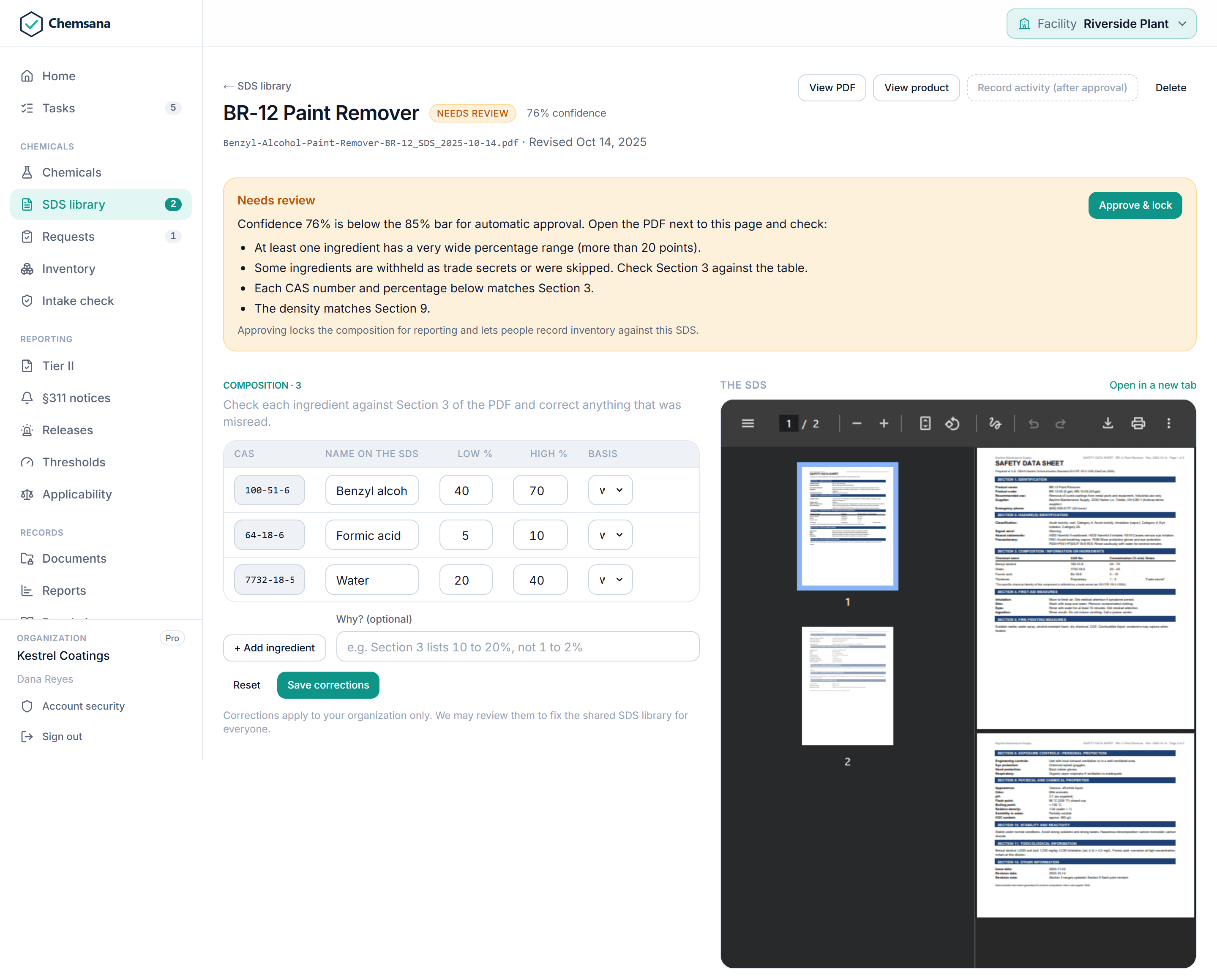
Upload a safety data sheet and Chemsana extracts the data compliance runs on. Every extraction is scored, reviewable, and logged with the model that produced it.
| SDS section | What is extracted |
|---|---|
| Section 1 | Product name and manufacturer. |
| Section 2 | GHS hazard classes and categories, which fill in Tier II hazard categories. Signal word, pictograms, and hazard statements. |
| Section 3 | CAS numbers, component names, concentration ranges and basis (w/w, w/v, v/v), and trade-secret flags. A component without a CAS number is skipped, never invented. |
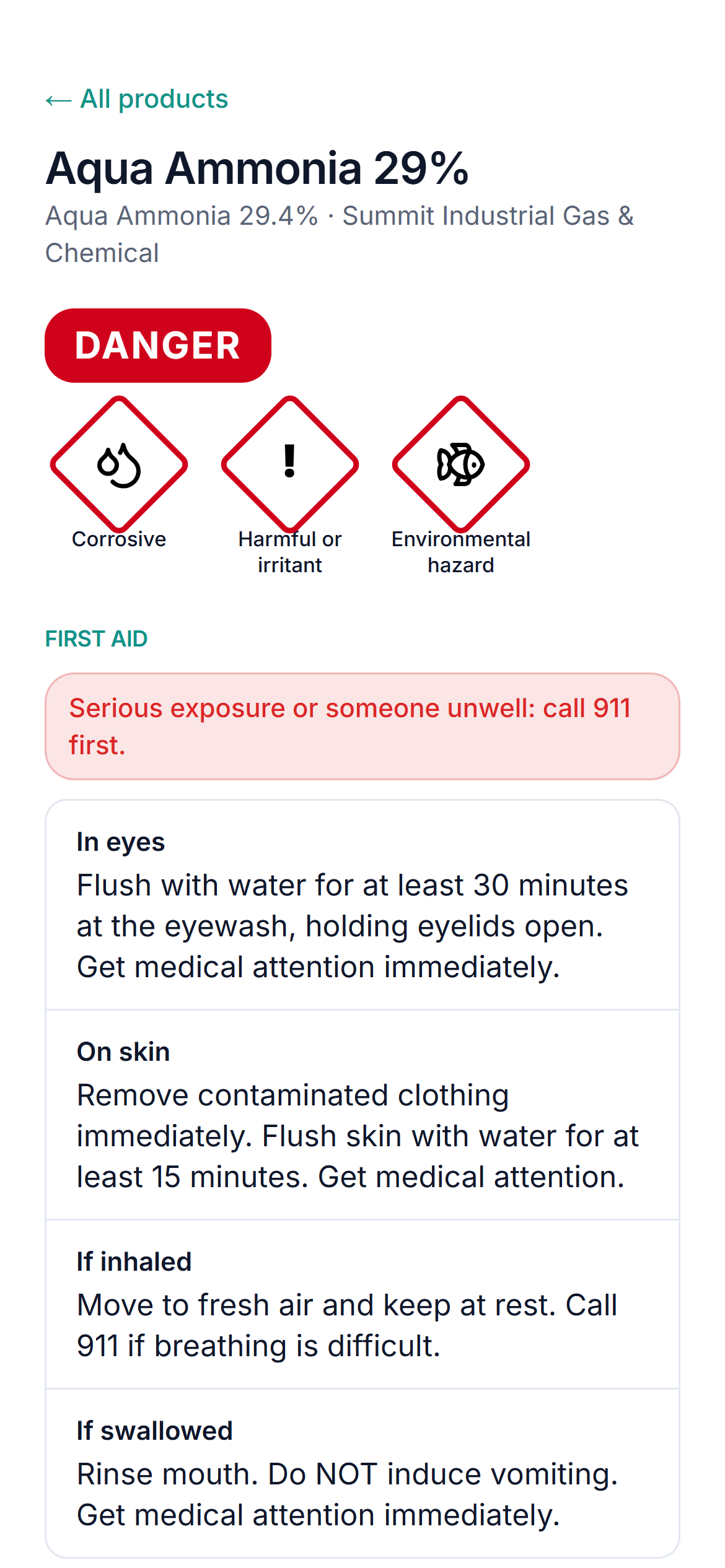
| Sections 4, 5, 8 | First aid by route of exposure, extinguishing media, and protective equipment, for the employee hazard summary. |
| Section 9 | Physical state, density (g/mL, specific gravity, lb/gal, °API, kg/m³, lb/ft³), flash point, and pH. |
| Section 16 | Issue and revision dates, which drive SDS freshness and renewal checks. |
Confidence scoring and review
Each extraction gets a deterministic score built from the checks a reviewer would run by hand: valid CAS checksums, a composition that can sum to 100%, ranges no wider than 20 points, a plausible density, no withheld components, and no mismatch between name and CAS.
- 0.85 and above: approved automatically, recorded as a system approval rather than a person
- 0.50 to 0.85: marked low confidence and sent to the review queue
- Below 0.50: a person must review it before the composition is used
The queue is ranked by consequence. A doubtful CAS number on an extremely hazardous substance comes before a missing phone number. Approval locks the composition and records who approved it. Only an admin can unlock it.
Revision tracking
A new revision is compared with the prior version and a notice is emailed. If the revision adds an extremely hazardous substance, approval warns that it starts a §311 clock and opens the notice at each facility holding the product.
Shared SDS library
An SDS already processed anywhere on the platform is recognized by its file fingerprint and reused, with no extraction wait and no charge against your upload allowance. Your product names, quantities, and flags are never shared.
Built for the people who handle the chemicals.
OSHA expects every employee to reach an SDS during their shift without barriers, and a good program approves a chemical before it arrives. Both run inside Chemsana.
Employee SDS access by QR code
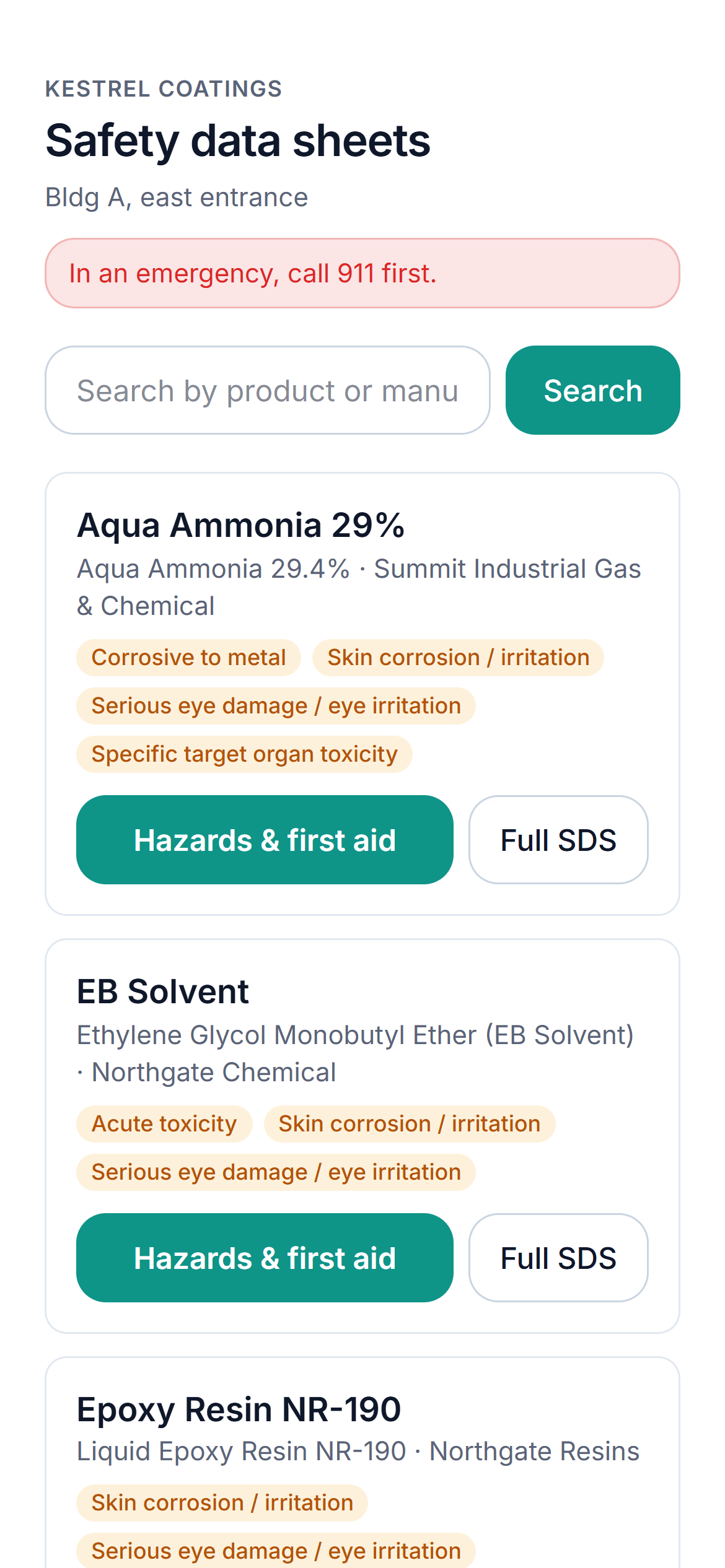
Admins create a link for each storeroom, shop, or lab and print its poster. Scanning it opens that location’s products on any phone, with no account and no sign-in.
- Location list: only the products stored there, searchable, each with its current SDS
- Hazard summary: signal word, pictograms, hazard statements, first aid by route, fire-fighting, and protective equipment on one screen
- Offline binder: the location’s SDSs as one PDF to print for network outages
- Control: links can be revoked, show when they were last used, and serve nothing outside their location
Chemical approval requests
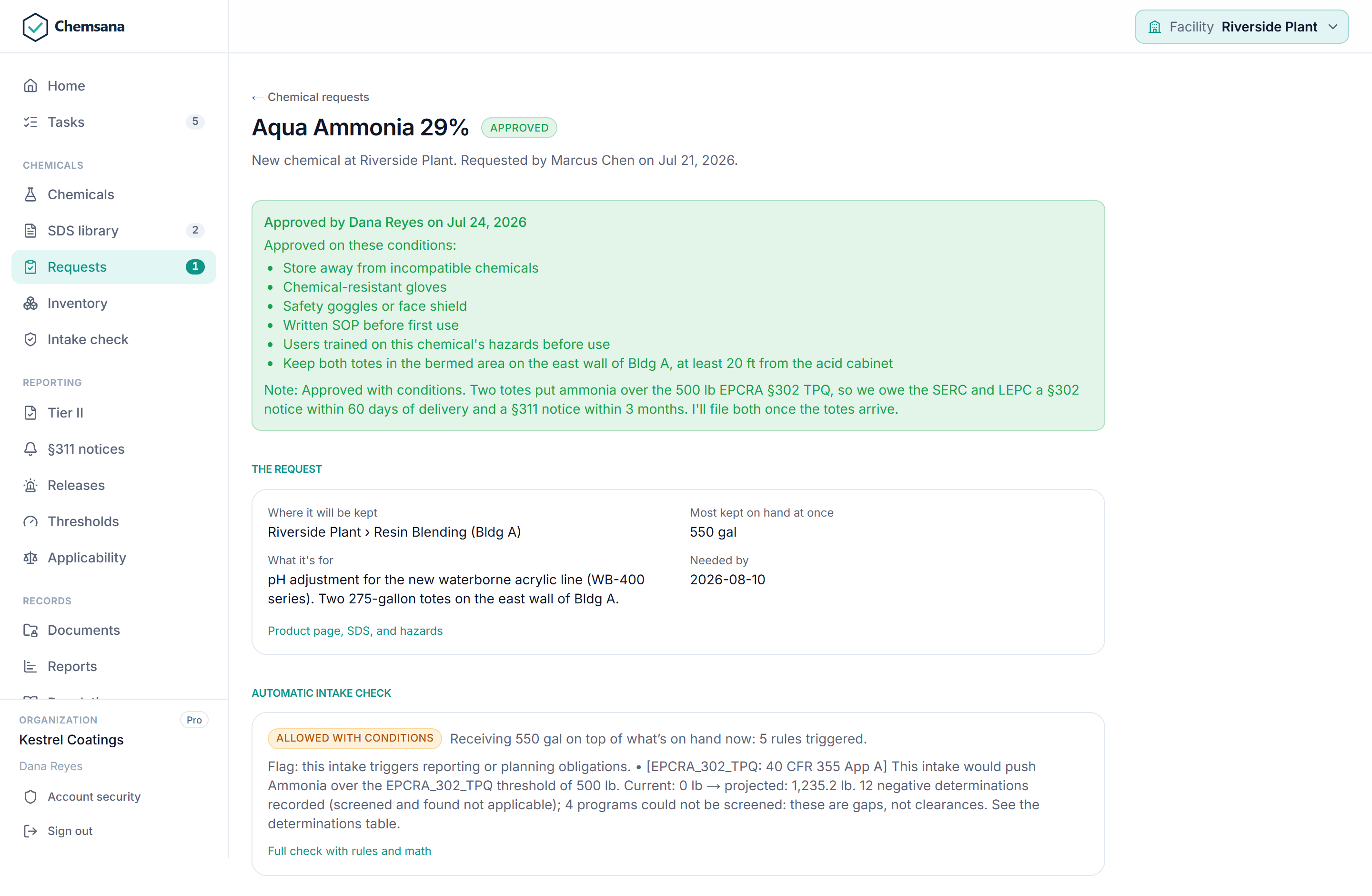
Anyone can ask for a chemical before it is bought: a new chemical, a new location, more quantity, or a new use. The request runs an intake check automatically and goes to the facility’s compliance owner as a task due in seven days.
| Decision | What it records |
|---|---|
| Approve | Approved as requested, with the intake check that supported it. |
| Conditions | Storage (flammable or corrosive cabinet, away from incompatibles), controls and PPE, procedures (written SOP, training, labeling, waste stream), or any other condition. |
| Decline | A reason is required, and the requester sees it. |
The request, its intake check, the decision, and the eventual receipt all attach to the product. An auditor asking why a chemical is on site gets the whole trail.
Site-wide totals at the CAS level.
Inventory is a ledger of events, not a table anyone can overwrite. Every total has a history, and every filing traces back to the receipts behind it.
| Method | How it works |
|---|---|
| Manual entry | Record a receipt, use, disposal, emission estimate, or adjustment. A move between locations posts a linked removal and addition, so it never inflates a total. |
| CSV import | Quantity on hand is read as a count, so re-importing a file sets stock instead of doubling it. Differences post as adjustments. Problems become data-quality flags. |
| Physical count | A guided count per location: match, wrong location, not found, or unexpected. Certifying the count posts the corrections and stands as evidence for that year’s Tier II. |
| REST API | Post single events, batches of up to 1,000, or transfers. Re-sending the same record is safe, and a conflicting change is rejected rather than duplicated. Reference connectors and an SAP MM / NetSuite field map are included. |
History is never edited in place. A correction posts as an adjustment, so the audit log shows what was believed at each point in time.
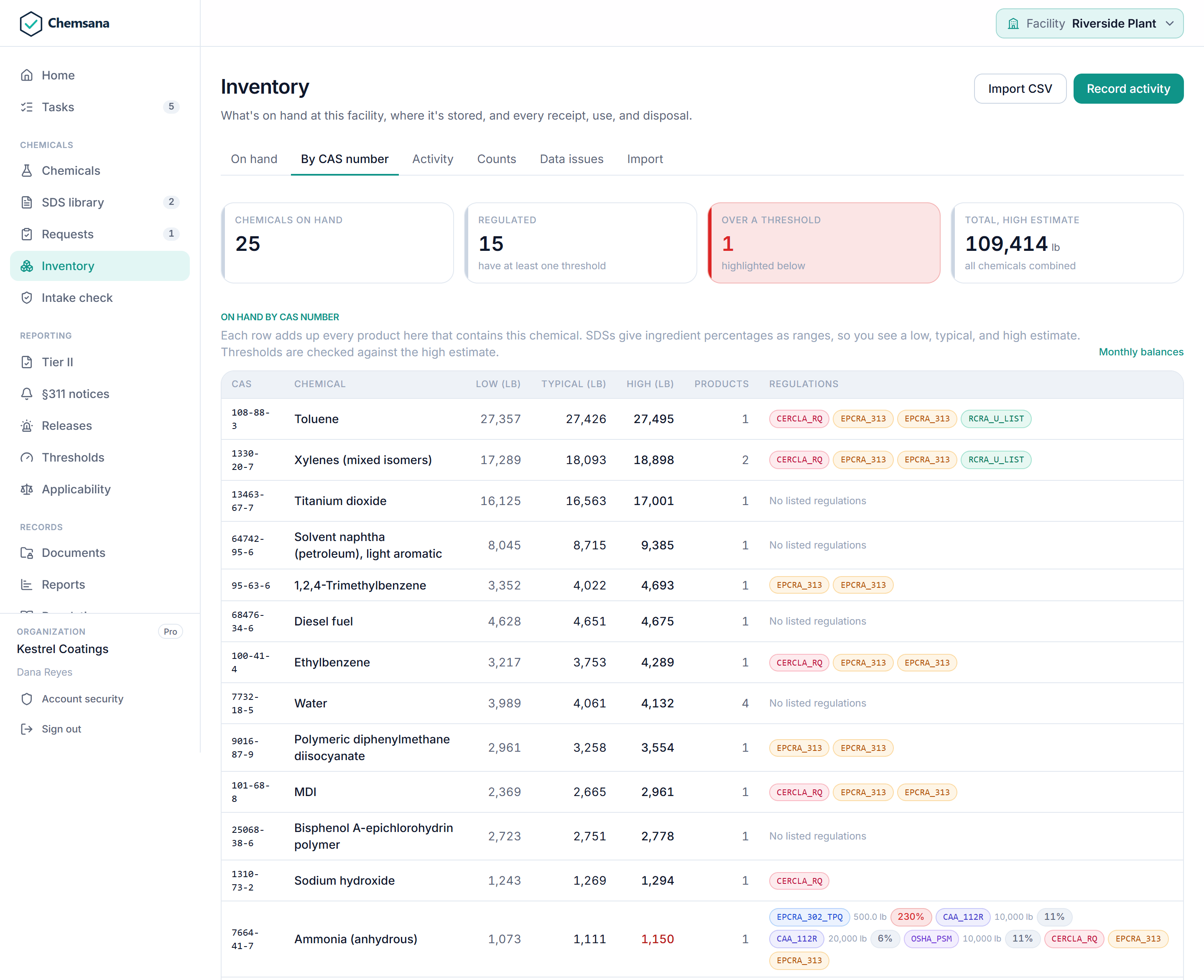
By CAS number
Each event’s quantity is multiplied through the product’s composition to get the mass of every component, then summed across the site.
With bounds
Totals carry a low, nominal, and high figure. Threshold decisions use the high figure.
Through your hierarchy
Locations roll up from container to area, building, site, and region. Each EPA facility is its own reporting unit.
Density, resolved in a fixed order
Everything resolves to pounds. For volumes, Chemsana uses a user override (which must carry a citation), then the product’s SDS, then the product default, then a reference value for the chemical, which is tagged on the decision as an assumption. With no density at all, the intake is blocked as “cannot be evaluated” and says why.
A decision before the chemical arrives.
Propose a receipt and Chemsana projects the new site total for every component, then screens it against 3,908 loaded federal rules and your own permits. Nothing touches inventory until you record it.
Three possible answers
- Allowed No rule is triggered. Each screened program is listed with the reason it came back clear.
- Flag A threshold is crossed or already exceeded, or a permitted chemical is present. Proceed with the obligation in view.
- Block A permit is set to block, or the intake cannot be evaluated reliably.
Every triggered rule shows its program, citation, threshold, current mass, added mass, and projected total. Decisions print as a one-page report and can be shared by expiring link, with confidential chemical identities redacted.
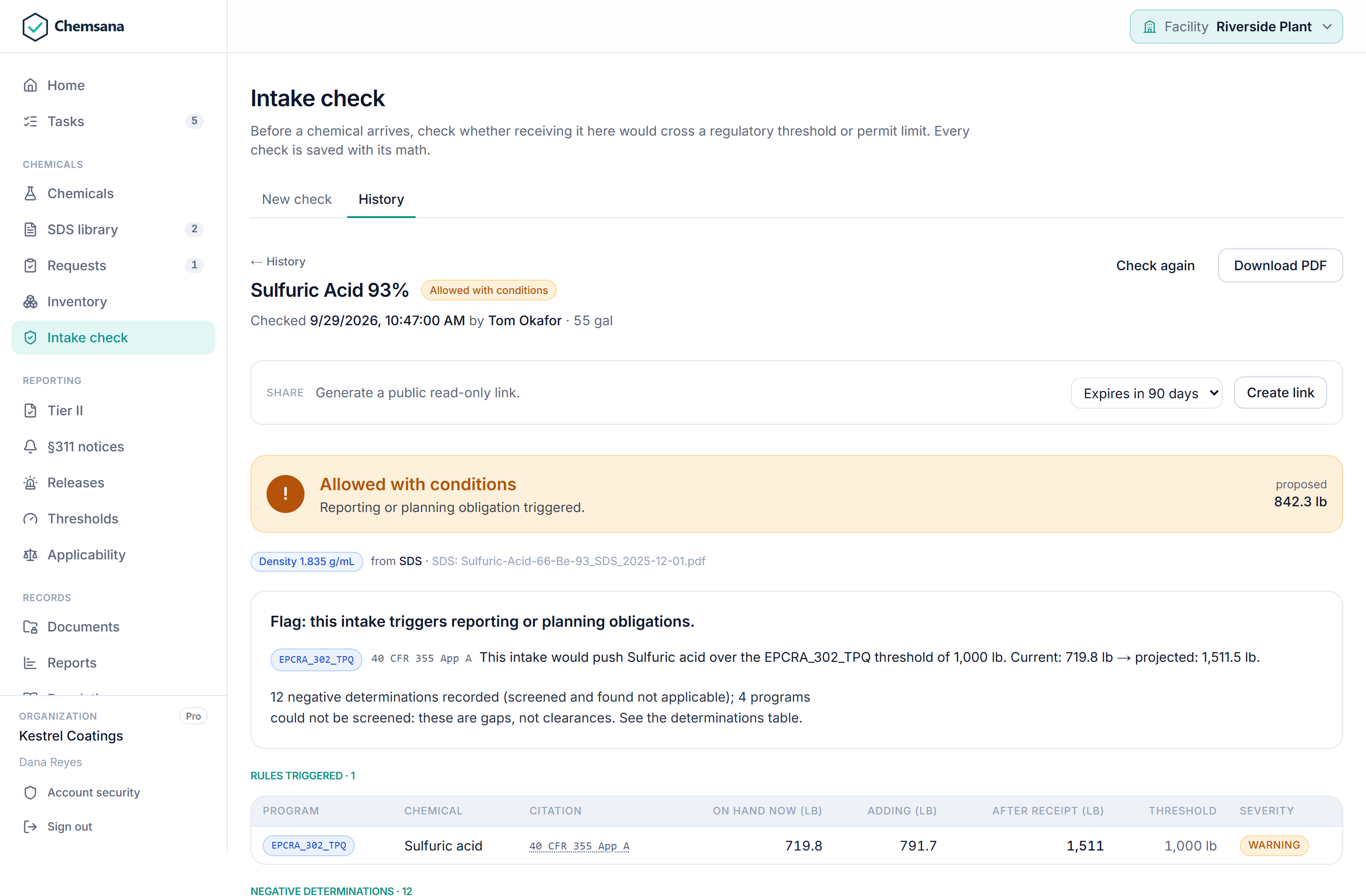
Negative determinations are recorded too
Below threshold, not listed, de minimis, exempt, or facility not subject, each with the list version it was checked against. A program that could not be screened shows as a gap. An inspector asking “how do you know this isn’t reportable?” gets a documented answer.
| Program | Citation | How it is applied at intake |
|---|---|---|
| EPCRA §302 EHS | 40 CFR 355 App. A | Storage threshold. Warns when crossed or already exceeded. |
| CAA §112(r) | 40 CFR 68.130 | Storage threshold. Warns when crossed or already exceeded. |
| OSHA PSM | 29 CFR 1910.119 App. A | Storage threshold, plus facility-level applicability screening. |
| CERCLA RQ | 40 CFR 302.4 | Shown for reference at intake. Applied in release reporting. |
| TRI / EPCRA §313 | 40 CFR 372.25 | Informational, with de minimis and facility applicability screening. |
| RCRA P and U lists | 40 CFR 261.33 | Informational. Counts toward generator status. |
| RCRA D001 / D002 | 40 CFR 261.21, 261.22 | Computed from SDS flash point and pH. |
| Your site permits | Air, water, waste | Named chemicals set to flag or block, with an optional limit. |
Filings built from the data you already keep.
Because inventory, composition, and regulations live in one system, the annual and event-driven filings come out of it directly instead of being rebuilt by hand each year.
Tier II, EPCRA §312
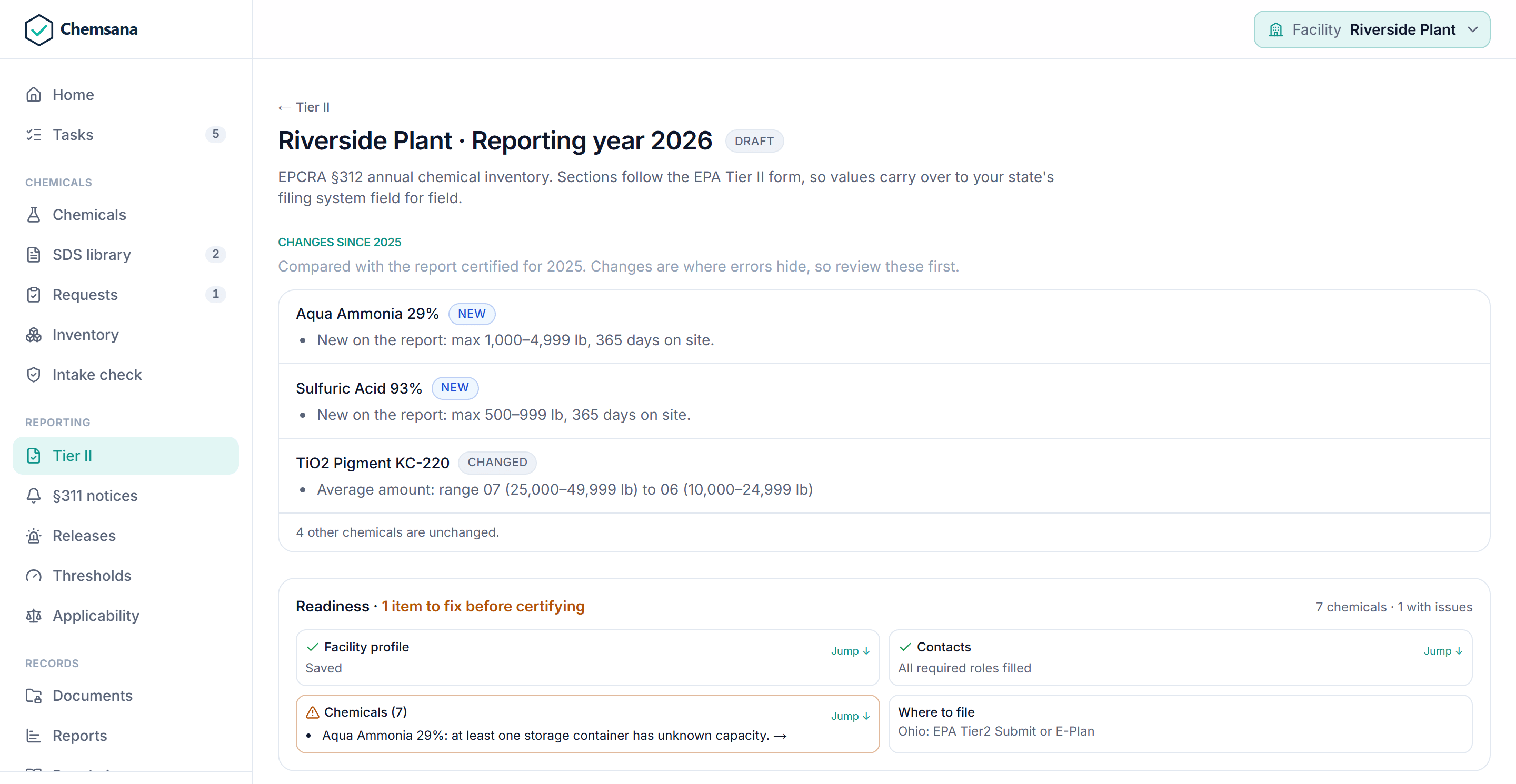
Calculated from the annual aggregate for each reporting unit. Range codes and hazard categories fill in automatically, and the report is e-signed with certification text.
- A board for the season: every facility by reporting year, from needs work to filed
- Changes since last year: chemicals added, removed, or changed against the prior certified report
- A filing record: date filed, confirmation number, and fee, kept with the certified report
| Export | Use |
|---|---|
| EPA Form 8700-30 (PDF) | The completed federal form, ready to submit or keep on file. |
| Tier2 Submit (.t2s) | Imports into Tier2 Submit and E-Plan, and into Tier II Manager states. |
| Tier II XML | NOAA / CAMEO EPCRA Tier II Data Standard v1. |
| Texas STEERS worksheet | A CSV laid out for entry into the Texas portal. |
Each reporting unit is routed to its state’s portal.
EPCRA §311 notices
When a chemical becomes newly reportable, or moves to a higher range code, Chemsana opens an alert with the 90-day deadline, reminds admins at 30, 14, 7, and 1 days, and prints the notice. Where a state accepts email, it goes to the SERC, LEPC, and fire department in one step, with delivery tracked.
Releases: CERCLA §103 and EPCRA §304
A release is screened against both the CERCLA and EHS reportable quantities, applying the lower. Chemsana provides the phone-notice script, tracks calls to the NRC, SERC, and LEPC, and prints the written follow-up.
Every limit, measured the way its rule measures.
A threshold only means something in its own scope. Chemsana measures each regulation against the quantity it actually counts, so a site total never stands in for a process or a fire-rated room.
| Regulation | Scope | What is measured |
|---|---|---|
| Tier II (§312) | Facility | On hand at any one time, against the hazardous chemical or EHS threshold. |
| EHS planning (§302) | Facility | On hand against the threshold planning quantity. |
| OSHA PSM, CAA §112(r) | Process | The facility total and the largest single location, as a stand-in for the largest process. |
| TRI (§313) | Facility, per year | Pounds used this calendar year, not stock on hand. |
| CERCLA RQ | Release | A reference for release reporting, not a storage limit. |
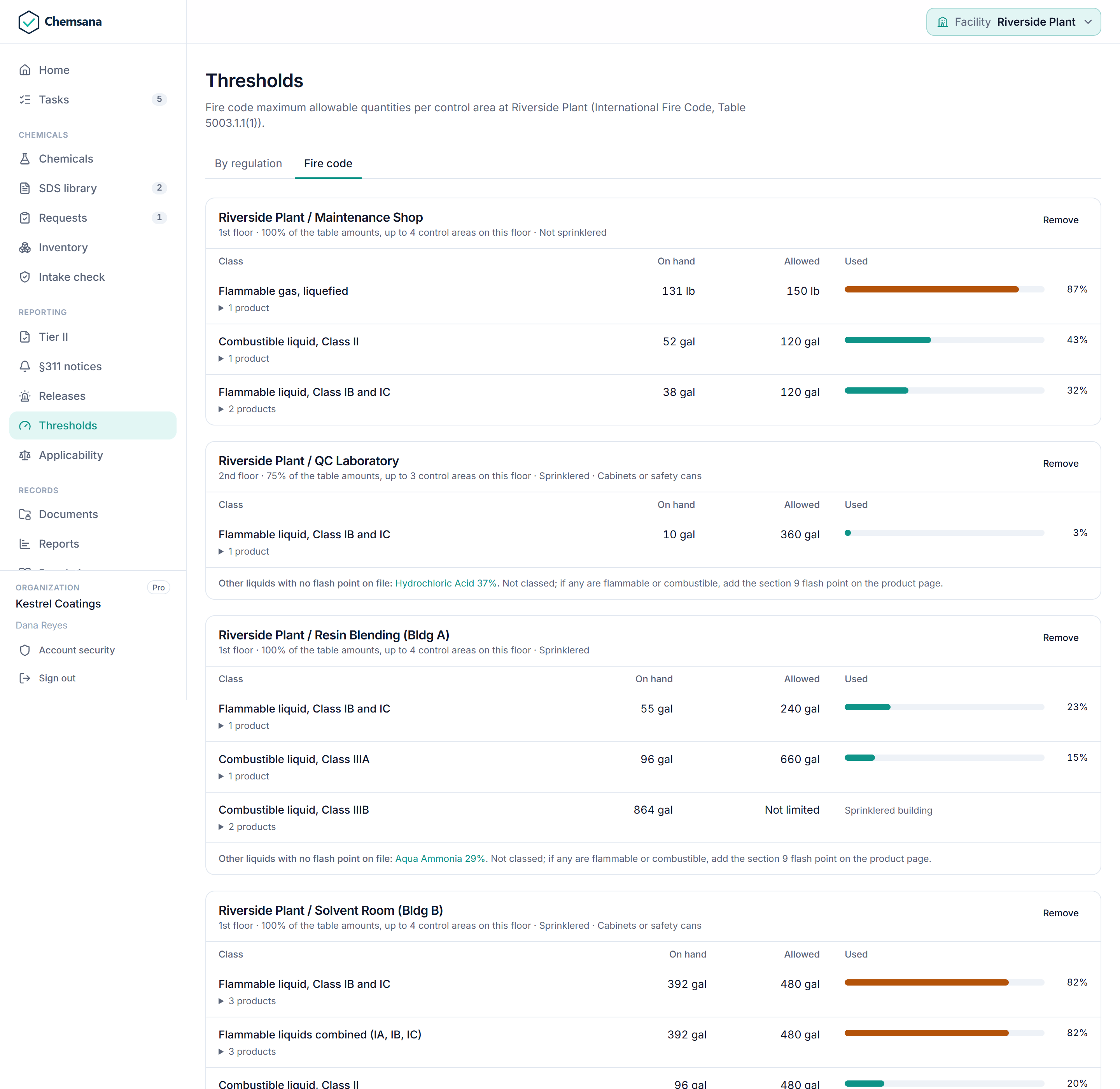
| Fire code (IFC) | Control area | Flammable and combustible liquids, flammable gases, and flammable solids against the maximum allowable quantities. |
Fire code limits by control area
Admins mark each control area with its floor, sprinkler protection, and whether flammables are kept in approved cabinets. Chemsana classes each liquid by flash point, Class IA through IIIB, totals each class in gallons, and compares it with IFC Table 5003.1.1(1), applying sprinkler and cabinet increases and the reductions for upper floors and basements. Liquids with no flash point on file are listed by name, never silently dropped.
| Report | What it shows |
|---|---|
| Defensibility package | One PDF with decisions and their rule traces, SDS chain of custody, and the inventory timeline. |
| Compliance roll-up | Posture across every site in a multi-site organization. |
| SDS library and review | Coverage, the five-year freshness rule, confidence distribution, and automatic versus human approvals. |
| Screens and logs | TRI and PSM facility applicability, data-quality flags, release history, and sign-in activity. Decisions, inventory, and documents also export to CSV. |
Running the program, not just the math.
Compliance is a set of recurring obligations with owners and deadlines. Chemsana tracks them alongside the data.
Command center and tasks
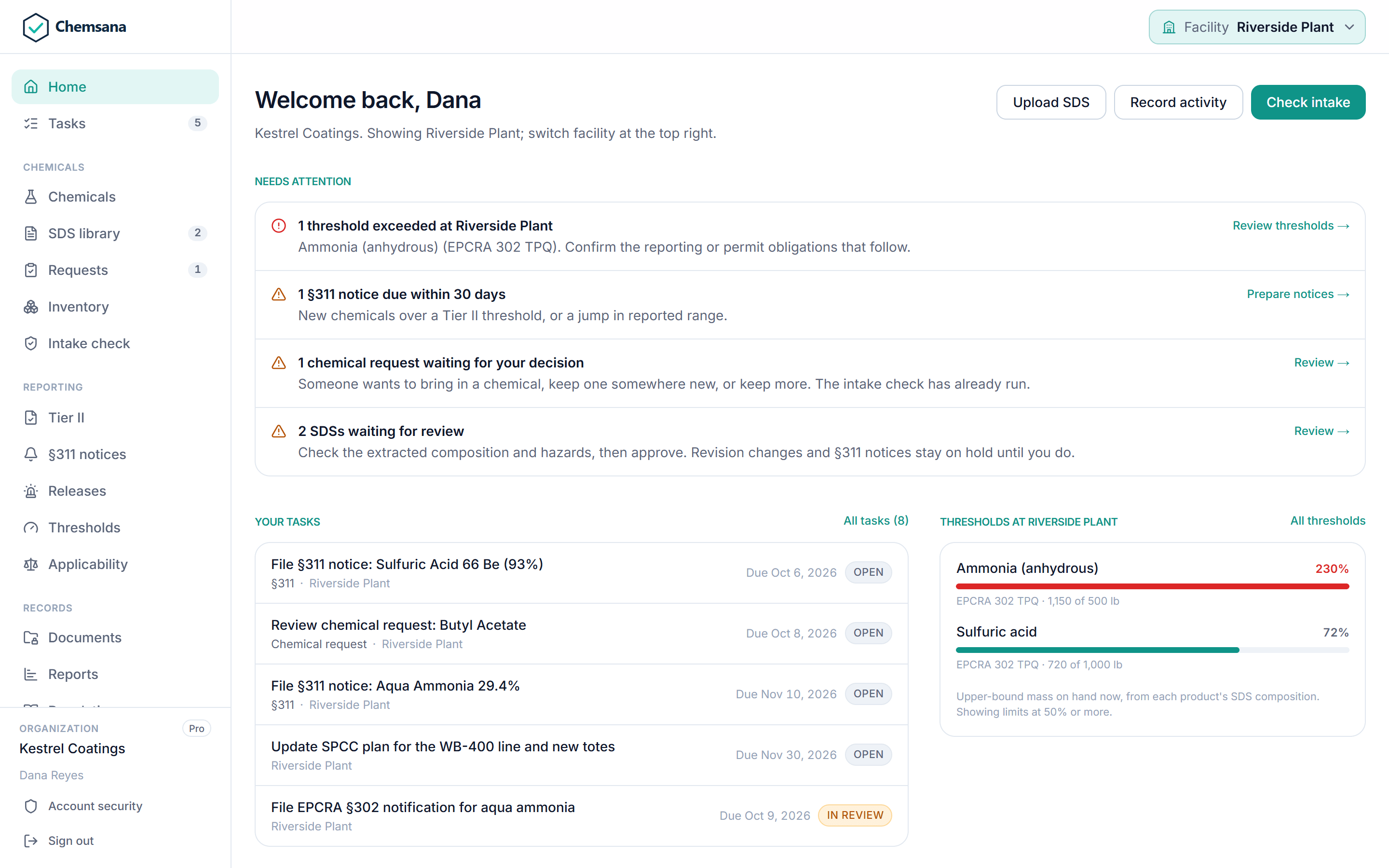
One home screen for items needing attention, threshold proximity, open tasks, and expiring documents, most urgent first. Tasks are created from §311 alerts, unsigned Tier II reports, data-quality flags, expiring documents, owed release notices, and approval requests, and assigned to each facility’s compliance owner.
Document vault
Permits, plans, inspections, manifests, training records, and more across 15 categories. Expiry dates create renewal tasks.
Multi-site
A configurable hierarchy of regions, sites, buildings, tank farms, processes, and containers. Switch between sites and organizations.
Roles
Organization admin, member, and read-only SDS viewer, enforced on the server, plus no-login QR access for employees. Unlimited users per site.
API
Documented OpenAPI 3.1 endpoints for inventory, transfers, containers, and Tier II preview. Keys are read-only or read-write, expire, and can be revoked.
Confidential chemicals
EPCRA trade secret, DHS security-sensitive, CBI, and customer NDA designations redact chemical identity on shared links and exported packages.
Regulatory list updates
When EPA publishes an update to the List of Lists, Chemsana compares it with the loaded version and emails the admins of every affected organization.
See it with your own chemicals.
Bring an SDS, an inventory export, and a permit. We will show you the decision and the math behind it.